ORM In Django
-
 Amrit Panta
- May 1, 2023, 11:26 p.m.
In this tutorial We will learn all about ORM related to Django.
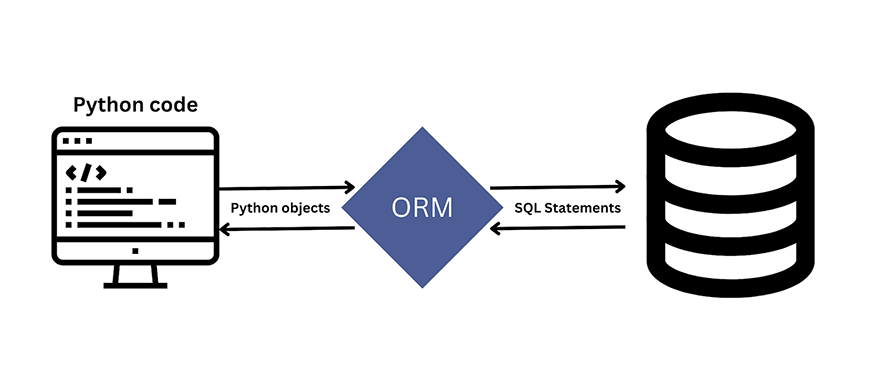
The Django ORM (Object-Relational Mapping) is a powerful and flexible component of the Django web framework that provides an intuitive way to interact with databases using Python code. The ORM allows you to define your database schema using Python classes, and interact with the data using Python objects, rather than writing raw SQL queries.ORM used to interact with various relational databases like SQLite, PostgreSQL, and MySQL through Querysets.
queryset: A QuerySets represents a collection of objects from your database. QuerySets allow you to read the data from the database, filter it and order it.
Consider a SQL query thats selects all the objects from the User table.
Select * from User;
Now equivalent Django ORM query would look like following python code:
User.objects.all()
You can use the query attribute to get SQL from Django QuerySet.
queryset = User.objects.all()
Now queryset variable contains all the users, then do
str(queryset.query)
Or
print(queryset.query)
render queryset
[user.first_name for user in User.objects.all()]
# result
['tommy', 'jack', 'raj']

# return multiple attributes
[[user.id, user.first_name] for user in User.objects.all()]
[[9, 'tommy'], [10, 'jack'], [14, 'raj']]
render all attributes of object instead of queryset
user = User.objects.all()

user[0].__dict__

# result
{'_state': <django.db.models.base.ModelState at 0x7f5412b470b8>,
 'id': 1,
 'password': 'pbkdf2_sha256$120000$0IG2o6fC8YtN$HUoWHTqV1tW+KDEUW5P2mSfX7JIQYx0/AsCWV0H837o=',
 'last_login': datetime.datetime(2021, 4, 12, 3, 40, 24, 780647, tzinfo=<UTC>),
 'is_superuser': True,
 'username': 'admin',
 'first_name': 'admin',
 'last_name': 'test',
 'email': 'admin@test.com',
 'is_staff': True,
 'is_active': True,
 'date_joined': datetime.datetime(2021, 4, 9, 16, 18, 33, 355065, tzinfo=<UTC>)}
ORM can be thought of as a translator converting Python code to SQL statements.
Here are the basic steps to use the Django ORM:
- Define models: The first step in using the Django ORM is to define your database schema using Python classes, known as models. Each model represents a table in your database, and its attributes correspond to the table's columns.
- Run migrations: After defining your models, you need to create the corresponding database tables by running migrations. Migrations are Django's way of propagating changes you make to your models into your database schema.
- Query data: Once you have defined your models and created the database tables, you can query the data using the Django ORM. You can use the
objectsattribute on a model to retrieve a QuerySet, which represents a collection of objects that match the given query. example: books = Book.objects.all()
Advantage of Using ORM
- Speeds-up Development - eliminates the need for repetitive SQL code.
- ORMs make project more portable
- Reduces Development Time.
- Easier to change databases
Disadvantage of Using ORM
- ORM has a tendency to be slow.
- ORM fails to compete against SQL queries for complex queries
Let's used django queryset for CRUD operation:
1.Create Object
There are three ways to create a new object in database.
- create() method
- save() method
- get_or_create()
1.create() method
Post.objects.create(title=“i love Django”)
# or
data = {'title': 'i love Django'}
Post.objects.create(**data)
2.save() method
To create an object, instantiate it using keyword arguments to the model class, then call save() to save it to the database.
post = Post(title="i love Django”)
post.save()
# Or
post = Post()
post.title = “i love Django”
post.save()
Django doesn’t hit the database until you explicitly call save().
The save() method has no return value.
saving foreignkey
author_1 = Author.objects.get(id=1)
post = Post(title="i love Django", author=author_1)
post.save()
saving manytomanykey
_viewers = Viewer.objects.get(id=1)
post = Post(title="i love Django")
post.save()
post.viewers.add(_viewers)

# If you want to save multiple Viewer in a Post then
_viewers = Viewer.objects.filter(id__lte=2).values_list('id', flat=True)
post = Post(title="i love Django")
post.save()
post.viewers.add(* _viewers)
3 .get_or_create() method
get_or_create() method first look for an object with given kwargs, and creates one if not found.
Return a tuple of (object, created), where object is the retrieved or created object and created is a boolean specifying whether a new object was created.
syntax:
get_or_create(defaults=None, **kwargs)
example:
obj, created = Post.objects.get_or_create(title="Nepal Will Play Asia Cup")
default is used where you don’t want to compare the value to get the object
obj, created = Author.objects.get_or_create(name=“Jone”, middle_name="Ram", defaults={‘last_name': “Bob”})
In above example it will look for Author with name “Jone” and middle_name “Ram” and not search for last_name.
If it found one then it will return that object, else create a new Author with name “Jone” middle_name “Ram” and last_name “Bob”
2.Retriving Object
In order to retrieve data form database, you need to construct a Queryset via a Manger on model class.
QuerySet Methods
Most commonly used QuerySet methods are:
- all()
- get()
- filter()
- exclude()
1.all()
used to retrive all the objects.this returns a copy of current queryset.
# get all the post
Post.objects.all()
Limiting QuerySets
Use a subset of Python’s array-slicing syntax to limit your QuerySet to a certain number of results. This is the equivalent of SQL’s LIMIT and OFFSET clauses.
# return first 3 objects (LIMIT 3)
Post.objects.all()[:3]

# return the sixth through tenth objects (OFFSET 5 LIMIT 5):
Post.objects.all()[5:10]

# return first object
Post.objects.order_by(‘title’)[0]
2.get()
it return a single objects.if there is no result match it will raise DoesNotExist exception.if more than one item matches the get() query , it will raise MUltipleObjectsReturned exception.
# retrieve a single post where id is 21
post = Post.objects.get(id=21)

# get post fields data
post.title
post.author.name
If there is no post with id 21 then get() method will raise DoesNotExist exception.
try:
   Post.objects.get(id=21)
except Post.DoesNotExist:
   print('post not found’)
If more than one item matches the query then it will rase MultipleObjectsReturned exception.
try:
   Post.objects.get(title__contains="Django")
except Post.MultipleObjectsReturned:
   print(‘Multiple Post found’)
get_object_or_404
get_object_or_404() method first look for an object with given kwargs, and if not found then raise Http404 error.
from django.shortcuts import get_object_or_404

def my_view(request):
    obj = get_object_or_404(Post, pk=1)
3.filter(**kwargs)
it returns a new queryset containing objects that match the given lookup parameters. filter() will always give a queryset , even if only a single object matches the query.
Post.objects.filter(title__exact=“Django”)
Post.objects.filter(pub_date__gt=datetime.date(2021, 1, 3))
Post.objects.filter(title__startswith=“Django”)
Post.objects.filter(title__endswith=“Django”)
Post.objects.filter(title__isnull=True)
# _in is used to filter on multiple values.
Post.objects.filter(id__in=[1, 3, 7])
4.exclude(**kwargs)
return QuerySet objects that do not match given parameters
# exclude post where publish date is greater than 3-1-2021
Post.objects.exclude(pub_date__gt=datetime.date(2021, 1, 3))
Student.objects.exclude(marks=70)
Other important methods of queryset
first()
first() method will return a single first object of a dataset.
# retrieve fist post, return single object
Post.objects.first()
last()
last() method will return a single last object of a dataset.
# retrieve last post, return single object
Post.objects.last()
exists()
exists() method will return True if QuerySet contains any result, and False if not.
Post.objects.filter(title__isnull=True).exists()
>>> True
latest()
Returns the latest object in the table based on the given field(s).
Post.objects.latest(‘pub_date’)

Post.objects.latest('pub_date', '-expire_date')
earliest()
Returns the earliest object in the table based on the given field(s).
Post.objects.earliest(‘pub_date’)

Post.objects.earliest('pub_date', '-expire_date')
values()
values() method is used when you want to select few columns off the table.
values() method returns a QuerySet as dictionaries, rather than model instance.
Post.objects.filter(title__isnull=True).values(‘id’, ‘title’)
>>> <QuerySet [{'id': 1, 'title': ‘title_1’}, {'id': 2, 'title': ‘title_2‘}]>

# get values with relationships
Post.objects.filter(title__isnull=True).values(‘id’, ‘author__name’)

# To get a values() of a single instance
Post.objects.values(‘id’, ‘author__name’).get(id=1)
values_list()
values_list() method is also used to select few columns off the table. But values_list() return the QuerySet as tuples.
Post.objects.filter(title__isnull=True).values_list(‘id’, ‘title’)
>>> <QuerySet [(‘id': 1, 'title': ‘title_1’), (‘id': 2, 'title': ‘title_2’)]>
If you set flat=True, then it will return results are single values, rather than one-tuples.
Post.objects.filter(title__isnull=True).values_list(‘id’, flat=True)
>>> <QuerySet [1, 2, 3]>
flat=True can only be used if you are passing a single field. If you pass more than one filed Django will raise an error.
If you set named=True, then results will be a namedtuple()
Post.objects.filter(title__isnull=True).values_list(‘id’, ‘title’, named=True)
>>> <QuerySet [Row(id=1, title=‘title_1'), Row(id=2, title=‘title_2')]>
To get a values_list() of a single instance
Post.objects.values_list(‘id’, ‘title’).get(id=1)
distinct()
distinct() method eliminates duplicate data from QuerySet.
Post.objects.distinct()

Post.objects.order_by(‘title’).distinct(‘title’)

Post.objects.order_by(‘title’, ‘author__name’).distinct(‘title’, ‘author__name’)

Post.objects.values(‘title’).distinct()
reverse()
reverse() method to reverse the order in which a queryset’s elements are returned.this work only when there is ordering in queryset.
my_queryset.reverse()
order_by()
QuerySets also allow you to order the list of objects using order_by() method.
Post.objects.order_by(‘title’)

# You can also reverse the ordering by adding - in the beginning
Post.objects.order_by(‘-title’)

# To order randomly you can use ?
Post.objects.order_by(‘?’)

# To order by a field in a different model,
Post.objects.order_by(‘author__name’)
# ordering two fileds
Post.objects.order_by(‘title’, ’author__name’)

# how not to order two fileds, Each order call will clear previous ordering.
Post.objects.order_by(‘title’).order_by(’author__name’)
using()
This method is using for controlling which database the queryset will be evaluated against. if you are using more than one db. the only argument this method takes is the alias of a db, a defined in DATABASES.
st=Student.objects.using('default') # by default all() method
dates()
dates(field,kind,order="ASC")
It returns a queryset the evaluates to a list of datime objects representing all available dates of a particular kind within the contents of the queryset.
where,
field -> it should be name of DateField of your model.
kind -> it should be either "year","month","week" or "day"
"year" -> return list of all distinct year values for the field
"month" -> return list of all distinct year/month values for the field
"week" -> return list of all distinct year/month/week values for the field
"day" -> return list of all distinct year/month/week/day values for the field
Student.objects.dates("pass_date","month")
datetimes()
datetimes(field,kind,order="DESC",tzinfo=None)
It returns a queryset that evaluates to a list of datime objects representing all available dates of a particular kind within the contents of the queryset.
where,
field -> it should be name of DateTimeField of your model.
kind -> it should be either "year","month","week" or "day"
"year" -> return list of all distinct year values for the field
"month" -> return list of all distinct year/month values for the field
"week" -> return list of all distinct year/month/week values for the field
"day" -> return list of all distinct year/month/week/day values for the field
tzinfo -> timezoneinfo
Student.objects.datetimes("pass_date","year")
none()
never return any object and no query will be executed.
union(*other_qs,all=False)
Use SQL's UNION operator to combine the results of two or more querysets. The UNION operator select only distinct value by default. To allow duplicate values , use the all=True argument.
st=qs2.union(qs1)
qs1=Student.objects.values_list("id","name",named=True)
qs2=Teacher.objects.values_list("id","name",named=True)
st=qs2.union(qs1)
#attributes of two tables must be same for the union operation
intersection(*other_qs)
Use SQL's INTERSECTION operator to combine the results of two or more querysets.
st=qs2.intersection(qs1)
qs1=Student.objects.values_list("id","name",named=True)
qs2=Teacher.objects.values_list("id","name",named=True)
st=qs2.intersection(qs1,qs3...)
#attributes of two tables must be same for the intersection operation
difference(*other_qs)
#syntax
st=qs1.difference(qs2)
defer(*fields)
only(*fields)
raw(raw_query,params=None,traslations=None)
select_related(*fields)
prefetch_related(*fields)
count()
qs1=Student.objects.all().count()
explain(format=None,**options)
Student.objects.all().explain()
as_manager()
aggregate(*args,**kwargs)
Sometime you will need to retrive value that are derived by summaizing or aggregating a colection of objects.
syntax: aggregate(name=agg_function("field"),name=agg_function("field"))
Returns a dictionary of aggregate values (averages, sums, etc.) calculated over the QuerySet.
Each argument to aggregate() specifies a value that will be included in the dictionary that is returned.
# Return Count of all the viewers on all the posts

from django.db.models import Count
Post.objects.aggregate(total_viewers_count=Count("viewers"))
>>> {"total_viewers_count": 6}

# add filter in query
Post.objects.filter(id__in=[3, 6, 8]).aggregate(total_viewers_count=Count("viewers"))
>>> {"total_viewers_count": 4}

# Return maximum, minimum and average viewers on posts

from django.db.models import Max, Min, Avg
Post.objects.aggregate(Max("viewers"), Min("viewers"), Avg("viewers"))
>>> {"viewers__max": 4, "viewers__min": 1, 'viewers__avg': 2.0}


# Get difference between maximum viewers count and minimum viewers count

from django.db.models import Max, Min
Post.objects.aggregate(viewers_diff=Max("viewers") - Min("viewers"))
>>> {"viewers_diff": 3}
Aggregate functions
Django includes seven aggregate functions:
- Avg. Returns the mean value of the expression.
- Count. Counts the number of returned objects.
- Max. Returns the maximum value of the expression.
- Min. Returns the minimum value of the expression.
- StdDev. Returns the population standard deviation of the data in the expression.
- Sum. Returns the sum of all values in the expression.
- Variance. Returns the population variance of the data in the expression.
.annotate()
Annotates each object in the QuerySet with the provided list of query expressions.
# Return Count of all the viewers on Post

from django.db.models import Count
Post.objects.annotate(viewers_count=Count(‘viewers’))[2].__dict__
>>> {
 	‘id’: 2,
	‘title': 'p3',
 	'author_id': 3,
    'viewers_count': 4
    }
annotate() method count the viewers for each Post and annotate the count to each object of QuerySet. Where Aggregate count viewers for all the post in the QuerySet.
.extra()
extra() method is used to rename columns in the ORM.
Post.objects.extra(select={'post_title': 'title'}).values('id', ‘post_title')[0]
>>> {'post_title': 'title_name_1', 'id': 1}
Sometimes, the Django query syntax by itself can’t easily express a complex WHERE clause. For these edge cases, Django provides the extra() QuerySet modifier — a hook for injecting specific clauses into the SQL generated by a QuerySet.
Post.objects.extra(select={'post_author_name': 'Select name FROM myapp_author where myapp_author.id = myapp_post.author_id'}).values('title', 'post_author_name')[0]
>>> {'post_author_name': ‘Jone', 'title': ‘title_name_1’}
Complex query with Q objects
You can import Q object from django.db.models
from django.db.models import Q
OR
| is used for OR operation between 2 Q expressions.
# return post where title contains Django or python
Post.objects.filter(Q(title__icontains="django") | Q(title__icontains=“python”))

Post.objects.filter(Q(title__icontains=“django”), Q(author_id=2) | Q(title__icontains=“python"))
AND
& is used for AND operation between 2 Q expressions.
# return post where title contains Django and python
Post.objects.filter(Q(title__icontains="django") & Q(title__icontains=“python”))
NOT
~ is used for NOT operation between 2 Q expressions.
# return post where title contains Django and not python
Post.objects.filter(Q(title__icontains="django") & ~Q(title__icontains="python"))
Query expression
Query expressions describe a computation or value used as a part of another query. Built-in query expressions:
- F(). Represents the value of a model field or annotated column.
- Func(). Base type for database functions like LOWER and SUM.
- Aggregate(). All aggregate functions inherit from Aggregate().
- Value(). Expression value. Not used directly.
- ExpressionWrapper(). Used to wrap expressions of different types.
- SubQuery(). Add a subquery to a QuerySet.
F() Expressions
F() expressions are used to refer to model field values directly in the database.
User.objects.annotate(_age=F(‘age’)*2).values(‘id’,’first_name’,’_age’)
3.updating objects
Update single object
post = Post.objects.get(id=1)
post.title = “new title”
post.save()
Update ForeignKey object
post = Post.objects.get(id=1)
post.title = “new title”
post.author.name = “new name”
post.save()
post.author.save()
Update ManyToManyKey object
post = Post.objects.get(id=1)
post.viewers.update(name=“new name")
Update multiple objects
Post.objects.filter(author__id__in=[1,2]).update(title="new title”)
update_or_create()
update_or_create() method used for updating an object with the given kwargs, creating a new one if necessary.
Return a tuple of (object, created), where object is the created or updated object and created is a boolean specifying whether a new object was created.
The update_or_create method tries to fetch an object from database based on the given kwargs. If a match is found, it updates the fields passed in the defaults dictionary.
obj, created = Author.objects.update_or_create(name=‘Jone’, defaults={'last_name': 'Bob'})
In above example it will search for a Author with name “Jone” and if found it will update last_name to “Bob”. And created variable will be False. If There are two or more Author with name “Jone”. It will rase error.
If Author with name “Jone” is not found then it will create a new Author with name “Jone” and last_name “Bob”. And created variable will be True.
4.deleting objects
Delete a single object
post = Post.objects.get(id=1)
post.delete()
Delete multiple objects
Post.objects.filter(author__id__in=[1,2]).delete()
some example of field lookups
it is similar to meet of an SQL where clause. if you pass an invalid keyword argument , alookup function will raise TypeError.
Post.objects.filter(title__exact=“Django”)
Post.objects.filter(title__iexact=“Django”)
Post.objects.filter(title__contains=“Django”)
Post.objects.filter(title__icontains=“Django”)
Post.objects.filter(title__exact=“Django”)
Post.objects.filter(pub_date__gt=datetime.date(2021, 1, 3))
Post.objects.filter(title__startswith=“Django”)
Post.objects.filter(title__endswith=“Django”)
Post.objects.filter(title__isnull=True)
Post.objects.filter(created_date__range('2022,6,7','2023,6,7'))
Post.objects.filter(created_date__date=date(2023,7,8))
Post.objects.filter(created_date__date__gt=date(2023,7,8))
Post.objects.filter(created_date__year=date(2023,7,8))
Post.objects.filter(created_date__month=4)
Post.objects.filter(created_date__week_day=1)
Post.objects.filter(created_date__week=23)
Post.objects.filter(created_date__quarter=2) #jan-march=1,april-jun=2
Post.objects.filter(created_date__time=time(6,7,8)) #(hour,minute,seconds)
Post.objects.filter(created_date__hour=2)
Post.objects.filter(created_date__minute=34)
Post.objects.filter(created_date__second=34)
Post.objects.filter(created_date__regex='')
Post.objects.filter(created_date__iregex='')
Post.objects.filter(id__in=[1, 3, 7])
Some Other ORM are describe here after:
treaks = Expedition.objects.filter(~Q(trek=None) & Q(status__system="Active"))