
Introduction and Architecture Overview of odoo
-
 Amrit Panta
- Jan. 23, 2024, 10:26 a.m.
Odoo is an open-source suite of integrated business applications that covers a wide range of business needs, including ERP (Enterprise Resource Planning), CRM (Customer Relationship Management), e-commerce, accounting, inventory management, project management, and more. It is designed to be modular and customizable, allowing businesses to choose and implement the specific modules that suit their requirements.
Key features and aspects of Odoo include:
-
Modular Architecture:
- Odoo is organized into various modules, each focusing on specific business functions. Modules can be installed individually or in combination, providing flexibility to businesses.
-
Open Source:
- Being open source means that the source code is freely available for anyone to view, modify, and distribute. This fosters a collaborative development community and allows businesses to customize the software to meet their unique needs.
-
Integrated Applications:
- Odoo provides a suite of integrated applications that can seamlessly communicate with each other. This integration allows for the flow of data and information across different business processes.
-
User-Friendly Interface:
- Odoo features a user-friendly and intuitive interface, making it accessible for users with various levels of technical expertise. The goal is to empower users to navigate and utilize the system effectively.
-
Customization:
- Businesses can customize and extend Odoo to adapt it to their specific workflows and requirements. This can be done through the creation of custom modules, views, and business logic.
-
Community and Support:
- Odoo has a vibrant community of developers, users, and contributors. The community actively participates in forums, discussions, and the development of additional modules. Additionally, there are commercial support options available for businesses that require professional assistance.
-
Scalability:
- Odoo is designed to be scalable, making it suitable for small businesses as well as larger enterprises. Companies can start with a few modules and expand their usage as their business grows.
-
Cloud and On-Premise Deployment:
- Odoo can be deployed either on-premise or in the cloud. This flexibility allows businesses to choose the hosting option that best suits their preferences and requirements.
-
Regular Updates:
- The Odoo community and the Odoo SA (the company behind Odoo) regularly release updates, improvements, and new features. This ensures that the software stays up-to-date with the latest technologies and business requirements.
Overall, Odoo provides a comprehensive and flexible solution for businesses looking to streamline their operations, improve efficiency, and integrate various business functions into a single platform. It has gained popularity for its open-source nature, modular structure, and ability to adapt to diverse business needs.
Odoo follows a multitier architecture, meaning that the presentation, the business logic and the data storage are separated. More specifically, it uses a three-tier architecture
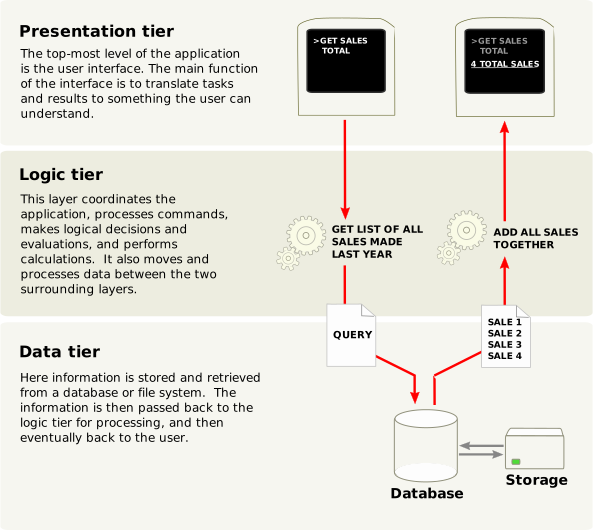
The presentation tier is a combination of HTML5, JavaScript and CSS. The logic tier is exclusively written in Python, while the data tier only supports PostgreSQL as an RDBMS.
Odoo modules
Both server and client extensions are packaged as modules which are optionally loaded in a database. A module is a collection of functions and data that target a single purpose.
Odoo modules can either add brand new business logic to an Odoo system or alter and extend existing business logic. One module can be created to add your country’s accounting rules to Odoo’s generic accounting support, while a different module can add support for real-time visualisation of a bus fleet.
Everything in Odoo starts and ends with modules.
Terminology: developers group their business features in Odoo modules. Modules may also be referred to as addons and the directories where the Odoo server finds them form the addons_path
Composition of a module
An Odoo module can contain a number of elements:
A business object (e.g. an invoice) is declared as a Python class. The fields defined in these classes are automatically mapped to database columns thanks to the ORM layer.
Define UI display
XML or CSV files declaring the model data:
-
configuration data (modules parametrization, security rules),
-
demonstration data
-
and more
Handle requests from web browsers
Static web data
Images, CSS or JavaScript files used by the web interface or website
None of these elements are mandatory. Some modules may only add data files (e.g. country-specific accounting configuration), while others may only add business objects. During this training, we will create business objects, object views and data files.
Module structure
Each module is a directory within a module directory. Module directories are specified by using the --addons-path option.
An Odoo module is declared by its manifest.
When an Odoo module includes business objects (i.e. Python files), they are organized as a Python package with a __init__.py file. This file contains import instructions for various Python files in the module.
Here is a simplified module directory:
module
├── models
│   ├── *.py
│   └── __init__.py
├── data
│   └── *.xml
├── __init__.py
└── __manifest__.py